
PhotoBroom vs Swipewipe
Short answer
PhotoBroom and Swipewipe both let you triage a camera roll by swiping, but swiping is one of PhotoBroom's seven cleanup categories and it is the entirety of Swipewipe's product. PhotoBroom analyses everything on the device with Apple Vision, shows every scan result free and meters only deletion, at 50 items of any type per calendar day plus 2 large videos. Swipewipe also ships on Android, wraps the swipe in an On This Day feed and a memory map, and funds its free tier with cooldown timers and advertising.
Key points
- Swipe triage is one of PhotoBroom's seven categories; in Swipewipe the swipe is the entire product.
- PhotoBroom locks nothing and hides no scan result, metering only deletion at 50 items of any type per calendar day plus 2 large videos; Swipewipe meters the work itself, with cooldowns and an ad-refillable swipe budget whose reported numbers conflict too widely to publish.
- Swipewipe's privacy policy reserves the right to upload photos to company or service-provider servers; PhotoBroom uploads no media at all.
- Swipewipe wins outright on Android, and on the nostalgia layer PhotoBroom does not attempt.
- Swipewipe advertises no large-video, short-video or screen-recording cleanup; PhotoBroom ships all three.
Is PhotoBroom or Swipewipe the better photo cleaner?
The choice is between two shapes, not two feature counts. Swipewipe is a swipe app: the library is partitioned into months and you work a month at a time, with an On This Day feed, a home-screen widget and a world map of your photo locations layered around that loop. PhotoBroom is a category app that happens to include a swipe deck — one that, since version 1.26, opens on months of its own: Swipe to Clean is one of seven cleanup surfaces, sitting next to Apple Vision clustering for Similar Photos and dedicated passes for Screenshots, Low Scored Photos, Screen Recordings, Large Videos and Short Videos.
Read the table below as a description of two different products, not a scoreboard. The one row that decides the question for many readers is the last one: Swipewipe runs on Android and PhotoBroom does not.
| PhotoBroom | Swipewipe (MWM) | |
|---|---|---|
| The core loop | Seven targeted categories, of which Swipe to Clean is one. That deck opens on a wall of months, which decide where you enter it and what the progress bar measures without fencing it. Similar groups are found by Apple Vision feature prints and reviewed group by group. | Chronological card triage. The library is split into months and you complete one month at a time, plus Recents and On This Day entry points. |
| What the free tier limits | Deletion volume only. Every category and every scan result is visible without paying; free users delete 50 items of any type per calendar day plus 2 large videos, resetting at device-local midnight. Keeping is free. | Time and attention. A free user completes roughly one month, then waits out a cooldown, with a separate per-session swipe budget topped up by watching an advertisement. The reported counts and durations conflict irreconcilably across sources and are not published here. |
| Advertising | None. No advertisement is shown to any user, free or paid, and no advertising SDK ships in the app. | Yes. The privacy policy names AdMob, InMobi, AppLovin, Vungle, ironSource, Mintegral and Pangle. |
| What the privacy documents say about photos | Media is analysed on the device with Apple’s Vision framework and is never uploaded. No account, no sign-up. | The privacy policy states that pictures and other information from the device camera and photo library “may be uploaded to the Company’s servers and/or a Service Provider’s server or it may be simply stored on Your device”. That is a reserved permission, not a description of observed behaviour. |
| What the App Store privacy label declares | No tracking and no data used to track you. | Identifiers, Usage Data and Other Data as used to track you, with third-party advertising and analytics data linked to the user. |
| Video cleanup | Large Videos with a configurable size threshold, Short Videos, and Screen Recordings as separate categories. | No video-specific cleanup surface is advertised on the listing. |
| Purchase model | Weekly and yearly cadences, plus a one-time lifetime unlock. | Weekly and yearly subscription products only; no lifetime or one-time purchase appears on the listing. |
| Platforms | iPhone and iPad on iOS 18.0 or later, plus Apple silicon Macs, where the iPad app runs against that machine’s own library. No Android build. 22 in-app languages across 30 App Store locales. | iPhone, iPad and Android, from iOS and iPadOS 18.0, the same floor as PhotoBroom, so Swipewipe is not the escape route on an iPhone stuck below iOS 18. 12 in-app languages. |
When is Swipewipe the obvious answer?
For some readers this comparison is already settled by that last row, and the rest of the page is optional reading.
Pick Swipewipe if you need Android, or if you need the same cleanup workflow across an iPhone and an Android phone. PhotoBroom has no Android build, and for a household or a person straddling both ecosystems that is decisive: this is a comparison PhotoBroom simply cannot win, and no feature count changes it. Inside the Apple ecosystem the two are matched: both run on iPhone and iPad, and PhotoBroom additionally runs on an Apple silicon Mac, where the iPad app works against that machine’s own Photos library. Android is the whole of the gap.
The other honest case is nostalgia. If what you actually want is a memory-rediscovery app that happens to free up storage — reliving old photos through On This Day, seeing your travels plotted on a map, keeping a daily home-screen widget habit — Swipewipe is built for that and PhotoBroom is not. PhotoBroom has essentially no nostalgia surface at all; it is a cleanup tool that finishes and gets out of the way. Swipewipe is also the more mature product by years, shipping since 2021 and acquired by MWM in 2024.
Everything below is for the reader who does not need either of those.
What does swiping actually do in each app?
Swiping records a decision in both apps, and neither commits a deletion on the gesture itself. What differs is the unit of work. Swipewipe’s unit is a calendar month: its FAQ states that you must complete the entire month, or Recents, or On This Day, and then review the photos one last time before they are deleted for good. PhotoBroom’s Swipe to Clean deals every photo and video in the library as a card, newest first, behind a wall of months you can enter at any point, and a swipe only marks the item; nothing leaves the library until the session is committed, and decisions persist between sessions so the deck can be abandoned mid-way and resumed — from version 1.26 the Home screen offers an unfinished pass back rather than leaving you to remember it.
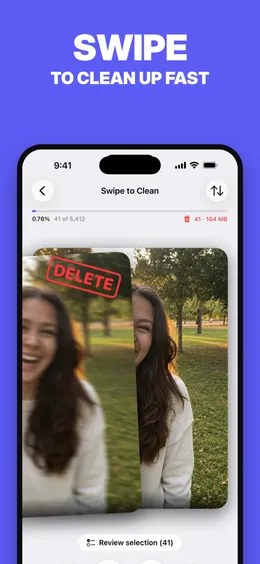
Both apps organise the work by month, and month-sized chunks are a better structure than an unbounded deck. Partitioning a 30,000-photo backlog into months turns an endless task into a finite one you can finish in a sitting, and independent reviewers single it out as a strength of Swipewipe’s design. PhotoBroom’s Swipe to Clean is built on months as well, from version 1.26 on: it opens on a wall of months, each showing its own best photograph developing from a faded print into full colour as that month is cleared, the progress bar measures the month you are in rather than the whole library, and finishing one is marked before the next begins.
What still differs is whether the month binds you. Swipewipe’s month is a unit of commitment — its FAQ states you must complete the entire month before the final review — which is a real commitment device if you want one, and a dead end if you open the app with four minutes and no appetite for finishing March. PhotoBroom’s month is an index: tapping one moves the cursor into the deck rather than fencing it, so you can enter anywhere, stop anywhere, and the cards carry on past the boundary. Whether that is better depends on whether you want the app to hold you to the month or only to show you where you are.
Swipewipe also offers Bookmarks for photos you are unsure about, so an undecided item can be parked without a verdict.
Which app covers the clutter that swiping never reaches?
PhotoBroom does, because six of its seven categories exist precisely for the clutter a card deck is a bad tool for. Screenshots are identified from photo library metadata, not inferred, so a year of receipts and chat captures can go in one selection pass. Large Videos has a configurable size threshold. Screen Recordings and Short Videos are separate passes. Low Scored Photos ranks shots by the Vision aesthetics score with adjustable sensitivity and an optional toggle that excludes deliberate document and utility captures.
Swipewipe advertises clutter detection for similar photos, blurry shots and screenshots alongside its swipe loop, plus AI enhancement for old or low-quality photos. What its listing does not advertise is any video-specific targeting: no large-video, short-video or screen-recording surface. Large videos are usually where the gigabytes actually are on a full phone. Detection is also a secondary feature there, not the core loop: users have reported poor success rates from its duplicate and similar detection.
How do the two free tiers compare?
The two free tiers meter different things, and the difference is more useful than any number. PhotoBroom locks nothing: all seven categories open, every scan result visible, and only deletion metered, at 50 items of any type per calendar day plus 2 large videos, resetting at device-local midnight, with marking a photo as kept costing nothing at all. Swipewipe meters the work itself. A free user completes roughly one month, then waits out a cooldown before the next unlocks, and a separate per-session swipe budget can be refilled by watching an advertisement.
The specific counts and cooldown durations reported for Swipewipe vary widely and irreconcilably across the available sources, several of which are low-quality aggregator pages, so no number for Swipewipe appears anywhere on this page. The shape is well attested; the amounts are not. What users have reported is that the reward-advertisement mechanic sometimes fails to grant the extra swipes it promises, and reviewers repeatedly describe the free tier as a demo.
Even the shape has a loose end. Weaker sources claim the cooldown escalates with each completed month; only that a wait exists is corroborated by an App Store review, so whether it grows or stays fixed is left open here. On the paid side, PhotoBroom sells a one-time lifetime unlock alongside its weekly and yearly cadences; the in-app purchase names surfaced on the Swipewipe listing are weekly and yearly subscriptions only.
What do PhotoBroom and Swipewipe declare about your photos?
PhotoBroom’s position is a single sentence: your photos and videos are analysed on your device and are never uploaded, there is no account and no sign-up, and the app declares no tracking on its App Store privacy label. Swipewipe’s position has to be quoted rather than summarised, because the distinction between permission and practice is the whole point. Its privacy policy (hosted on TermsFeed and still issued in the name of the original developer, Afternoon Products LLC) states that pictures and other information from the device camera and photo library “may be uploaded to the Company’s servers and/or a Service Provider’s server or it may be simply stored on Your device”.
That is a permission the vendor has reserved. It is not a description of what the app does.
No evidence was found that photos are uploaded during ordinary cleanup, and nothing on this page asserts that they are. Separately and independently checkable: the US App Store privacy label declares Identifiers, Usage Data and Other Data as used to track you, with third-party advertising and analytics data linked to the user, and NowSecure’s public app risk report flags a missing iOS Privacy Manifest and a missing Privacy Tracking Declaration. Some aggregator pages describe Swipewipe as keeping photos entirely on-device; that description cannot be reconciled with the policy text above, so it is not repeated here as fact.
That reserved permission is the sharpest difference between the two privacy positions, and it is also where the checkable evidence stops. Whether photo data is in practice uploaded during ordinary use is unknown here: only the permission is documented, and a permission is not a behaviour. The feature where it would most plausibly bite is the AI photo enhancement, which is exactly the sort of work that often runs on a server, but whether Swipewipe’s does was never verified, and inference is not evidence. Swipewipe’s Google Play data safety declarations could not be retrieved either, so the Android-side disclosures behind the platform advantage above remain unread.
One practical note for anyone checking this themselves. The App Store title appears to be A/B tested: the same listing has surfaced as “Swipewipe: Photo Cleaner”, “Photo Cleaner: Swipewipe” and “Swipewipe: Photo Storage”. So this page anchors on the one listing MWM publishes, not on the name it happens to be wearing. If Swipewipe is already installed and the question is what to move to rather than which of these two to choose, the full field of replacements, including the ones that beat PhotoBroom on specific jobs, is in Swipewipe alternatives.
Questions
Is PhotoBroom or Swipewipe better for cleaning up an iPhone?
It depends on which loop you want. Swipewipe is built around card triage partitioned month by month, with an On This Day feed and a photo map layered on top. PhotoBroom's deck is organised by month too, but it treats swipe triage as one of seven categories, alongside Vision-based similar-photo clustering, Screenshots, Low Scored Photos, Screen Recordings, Large Videos and Short Videos. If your storage problem is a few enormous videos, PhotoBroom targets them directly and Swipewipe advertises no video-specific cleanup at all.
Does Swipewipe upload your photos?
No evidence was found that Swipewipe uploads photos during ordinary cleanup, and this page does not claim it does. What can be stated is the permission its own policy reserves: the TermsFeed-hosted privacy policy says pictures and other information from the device camera and photo library "may be uploaded to the Company's servers and/or a Service Provider's server or it may be simply stored on Your device". PhotoBroom's media is analysed on the device and is never uploaded.
Is Swipewipe free to use?
Swipewipe has a free tier, but it is metered by time and by advertising rather than by a simple allowance. A free user works through roughly one month of photos, then waits out a cooldown before the next unlocks, and a separate per-session swipe budget can be topped up by watching an advertisement. The specific counts and durations reported for those limits conflict irreconcilably across sources, so no number for Swipewipe appears on this page.
Does PhotoBroom have a swipe mode like Swipewipe?
Yes, and since version 1.26 it is organised by month, as Swipewipe's is. Swipe to Clean opens on a wall of months, each carrying its own cover photograph that fills with colour as you clear it; tapping one moves the cursor into a deck of every photo and video in the library, newest first, with swipe right to keep and swipe left to delete. The difference from Swipewipe is that the month does not fence you in: it sets where you enter and what the progress bar measures, and the cards keep coming past it. Swiping only marks a decision, and nothing leaves the library until the session is committed. Decisions persist between sessions, so the deck can be put down and picked up later.
Does Swipewipe work on Android?
Yes, and this is the one comparison PhotoBroom cannot win. Swipewipe ships on Android alongside iPhone and iPad. PhotoBroom covers the Apple side just as widely, with iPhone, iPad and Apple silicon Macs on the same purchase, but it has no Android build at all, and requires iOS 18.0. Anyone who needs the same cleanup workflow on an Android phone should pick Swipewipe.
Which app is better for a very large photo library?
Neither is unambiguously better, and both have a documented weak point. Swipewipe users have reported crashes during long sessions and on large batch deletions, and very small working batches. PhotoBroom's free tier caps deletion at 50 items of any type per calendar day plus 2 large videos, which is a poor fit for a 20,000-photo backlog unless the daily cap is removed with Pro.