Seven categories
What it finds
PhotoBroom sorts your library into seven kinds of clutter, each detected a different way and each reviewed in the interface that suits it. Every one is open to everyone: no category is locked behind the paywall, and scan results are always fully visible.
iPhone · iPad · Apple silicon Mac
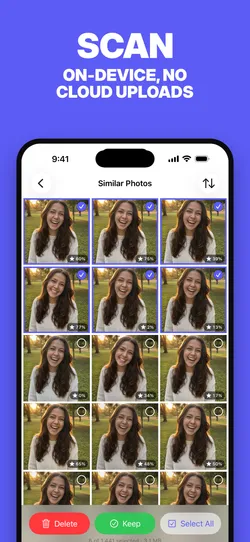
Similar Photos
Groups near-identical shots, like the six frames you fired off to get one good one, and lets you keep the best and remove the rest.
Swipe to Clean
Triages your whole library one card at a time (swipe right to keep, left to delete), opening on a wall of months so the backlog no category filter will catch arrives in piles you can finish.
Screenshots
Collects every screenshot in your library into one grid so a year of receipts, maps and chat captures can go in a single pass.
Low Scored Photos
Surfaces your weakest shots (blurred, badly framed, accidental), rated by an on-device model, worst first.
Screen Recordings
Gathers screen recordings, which are usually long, large, and watched exactly once.
Large Videos
Lists videos above a size threshold you set: the handful of files quietly holding most of your storage.
Short Videos
Finds the accidental one-second clips from a mis-pressed shutter, below a duration you choose.
Detection
How each one is detected
| Category | How PhotoBroom detects it |
|---|---|
| Similar Photos | Photos taken within a configurable time window of each other (five minutes by default) are compared using Apple Vision feature prints. Shots whose prints fall within a similarity threshold are clustered into a group. The highest-scoring photo in each group is highlighted and pre-selected. |
| Swipe to Clean | Every photo and video in the library is dealt as a card, newest first, behind a wall of months you can enter at any point — each month carrying its own best photograph, which develops from a faded print into full colour as you clear it. Swiping only marks a decision; nothing is removed until you commit the session, so a swipe is never destructive on its own. |
| Screenshots | Screenshots are identified from the photo library metadata itself, because iOS tags them at capture time, so detection is exact rather than inferred. No guessing, no false positives. |
| Low Scored Photos | Apple Vision scores each photo for overall aesthetic quality on device. Photos at or below a cutoff you control appear here, lowest first, each showing its score. An optional setting also folds in utility captures such as documents, receipts and scans, which the same model flags separately. |
| Screen Recordings | Like screenshots, screen recordings are tagged by iOS at capture time, so this category is an exact match rather than a heuristic. |
| Large Videos | Videos over a configurable size (100 MB by default, adjustable from 25 MB to 5 GB) are listed largest first. A few of these usually account for more space than thousands of photos. |
| Short Videos | Videos shorter than a threshold you set (three seconds by default) are collected here. Live Photos are excluded automatically; they are not accidental clips and should not be swept up with them. |
On device
Everything happens on your iPhone
PhotoBroom analyses your library using Apple’s Vision framework, running on your device. No media is uploaded to any server, there is no account, and there is no sign-up. Scanning is incremental. After the first pass it only looks at photos it has not seen.
Free users can delete 50 items of any type per day, plus 2 large videos. PhotoBroom Pro removes the daily limit and adds Auto-Process All Groups.