
Do You Need a Duplicate Photo App if iPhone Has One?
Short answer
For exact duplicates, the iPhone's built-in Duplicates album is enough for most people, and PhotoBroom does not replace it. Apple's iPhone User Guide documents the Photos app collecting duplicates into a Duplicates collection and merging each set into the highest-quality copy. PhotoBroom exists for the clutter that album has no feature for: near-identical burst frames, screenshots, screen recordings, oversized videos and low-scored shots. If duplicate copies are the whole problem, stop at the built-in album.
Key points
- Apple documents the Photos app collecting duplicates into a Duplicates collection under Collections, then Utilities.
- Merging in Photos keeps the highest-quality version and the combined metadata; PhotoBroom has no merge, it keeps one item and deletes the rest.
- Apple publishes no matching criteria for the Duplicates collection: no threshold, no time window, no definition.
- The Duplicates collection is free, needs no install, covers videos as well as photos, and works on iOS 16 or later; PhotoBroom requires iOS 18.0.
- PhotoBroom is worth installing for the categories Photos has no equivalent feature for, not for exact duplicates — and not for screenshots or screen recordings, which Photos already groups under Media Types.
What does the iPhone Duplicates album actually do?
The iPhone Duplicates album collects duplicate items and offers to merge them, and Apple documents the whole behaviour in three sentences. Apple’s guide states that “the Photos app identifies duplicate photos and videos in your photo library in the Duplicates collection”, reached by tapping Collections, then Utilities, then Duplicates (Apple, Merge duplicate photos and videos on iPhone, read 2026-08-03). Merging, in the iOS 16 edition of the same page, “combines the highest quality version and all of the relevant data across the duplicates, and keeps that one in your library”, and “the remaining duplicates are moved to the Recently Deleted album”. Apple also documents that the collection does not appear at all when a library has no duplicates in it.
What Apple does not publish is the rule. There is no stated similarity threshold, no time window, no definition of what makes two files duplicates rather than merely alike. That silence is worth noticing before assuming the album has already caught everything.
Who genuinely does not need a duplicate photo app?
Anyone whose storage problem is literally duplicate copies. If a batch was imported twice, if someone sent back a photo already in the library, or if a restore doubled part of the roll, the Photos app Duplicates collection is the right tool and PhotoBroom adds nothing to that job. It is free, already installed, covers videos as well as photos, merges instead of deleting, and needs no third-party access to the photo library at all.
The built-in album is enough when three signals hold together: the Duplicates collection is showing a meaningful count, the library is under a few thousand items, and screenshots and video files are not part of the complaint.
Match all three and you should merge and stop there.
What does each tool cover?
The two tools do not overlap much. Apple’s Duplicates collection is a single, narrow, free feature for identical items; PhotoBroom is seven detection categories aimed at clutter that is not identical to anything. The table below is a division of labour, not a ranking.
| Tool | What it finds | What happens to the matches | What using it costs | Requirements |
|---|---|---|---|---|
| Photos app Duplicates collection (Apple) | Duplicate photos and videos, as classified by the Photos app. Apple publishes no matching criteria: no threshold and no time window. | Merge keeps the highest-quality version plus the combined data and moves the rest to Recently Deleted, where items stay 30 days. | Nothing. It is part of iOS and there is no purchase of any kind. | Documented from the iOS 16 edition of the iPhone User Guide onward. Nothing to install. |
| PhotoBroom | Seven categories: Similar Photos, Swipe to Clean, Screenshots, Low Scored Photos, Screen Recordings, Large Videos, Short Videos. Similar Photos clusters shots taken within a configurable window, five minutes by default, using Apple Vision feature prints. | Deletion, not merging. In a similar group the highest-scoring shot is pre-selected to keep and the rest are removed; no metadata is combined. Deleted items land in Recently Deleted like any other deletion. | Every cleanup category is free and every scan result is visible. Free deletion is metered at 50 items of any type per calendar day plus 2 large videos. | iOS 18.0 or later, iPhone and iPad. Requires photo library access. |
Which storage problem do you actually have?
Match the symptom to the tool; installing on principle helps nobody. Exact duplicates are the one row where the built-in album is the complete answer; the other rows are the reason a separate app exists at all.
| The problem | What the Photos app offers | Whether PhotoBroom adds anything |
|---|---|---|
| The same photo or video saved twice | The Duplicates collection, with a merge that preserves the highest-quality copy | No. Use the built-in album. PhotoBroom has no merge and no advantage here |
| Six near-identical frames from one burst, none of them exact copies | Nothing documented. Apple’s Duplicates collection is documented for duplicates only | Yes. Similar Photos clusters shots within a configurable time window and pre-selects the top-scored one |
| A year of accumulated screenshots | Media Types contains a Screenshots collection to browse, and Select allows multi-selection | Marginally. The detection is the same iOS capture-time tag; what differs is bulk selection ergonomics |
| A few videos quietly holding most of the storage | Nothing that sorts videos by file size | Yes. Large Videos lists videos above a threshold you set, largest first, with exact sizes |
| Photos that came out blurred or badly framed | Nothing. Apple documents no quality ranking in Photos | Yes. Low Scored Photos ranks by an on-device Apple Vision aesthetics score against a cutoff you control |
| Accidental one-second clips from a mis-pressed shutter | Nothing that isolates them by duration | Yes. Short Videos collects clips below a duration you set, excluding Live Photos |
What does the Photos app do better than PhotoBroom?
One of the advantages below is structural and the rest are practical. Merging is the structural one: Apple’s Duplicates collection consolidates a set into a single item carrying the highest-quality version and the combined data, whereas PhotoBroom keeps one item and deletes the others, so nothing is merged and no metadata is recombined. Videos are covered by Apple’s duplicate detection and are not part of PhotoBroom’s Similar Photos clustering. Reach favours Apple too: the Duplicates album is documented from the iOS 16 edition of the User Guide, while PhotoBroom requires iOS 18.0 and will not install on an older iPhone. And nothing is metered: Apple imposes no daily allowance, while PhotoBroom’s free tier allows 50 items of any type per calendar day plus 2 large videos.
There is also a trust argument that costs Apple nothing. Using the Duplicates collection grants no third-party app access to the photo library, because no third party is involved.
What does PhotoBroom add that the Photos app has no feature for?
Five of PhotoBroom’s seven categories have no counterpart in Photos. The other two cover ground Apple already covers, and the split between those two groups is the honest shape of this comparison. All of it runs on the device using Apple’s Vision framework. Nothing is uploaded, there is no account and no sign-up, and there is no advertising in the app.
The five Photos has no equivalent for
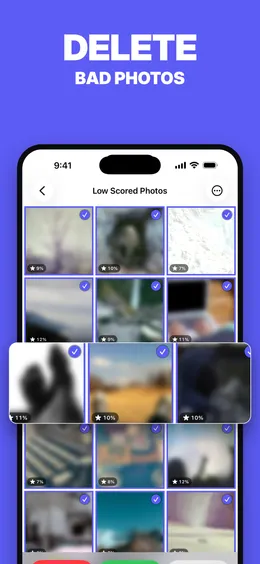
Where Apple’s Duplicates collection merges files it has judged to be the same file, Similar Photos works on shots that are not the same file at all: it compares photos taken within a configurable window — five minutes by default — using Apple Vision feature prints, clusters the ones whose prints fall inside a similarity threshold, and highlights the highest-scoring frame so the group can be reduced to it. Low Scored Photos applies the same scoring to the library as a whole, ranking it by an on-device Vision aesthetics score with a cutoff you set, and can optionally fold in document and receipt captures.
The remaining three of the five need no scoring at all. Large Videos lists videos above a size threshold, adjustable from 25 MB to 5 GB and set at 100 MB by default, largest first with exact file sizes shown. Short Videos isolates clips below a duration you choose, three seconds by default, excluding Live Photos. Swipe to Clean deals the whole library out as cards, one decision at a time, behind a wall of months that sets where you enter and what the progress bar measures.
The two that only change the ergonomics
Screen Recordings and Screenshots are not new ground. Both use the tags iOS applies at capture time (the same tags behind Apple’s own Media Types collections), so detection there is identical; what PhotoBroom adds is bulk selection, file sizes and sorting, not better finding.
Nobody should install an app for those two alone.
When should you use Apple Photos instead?
Stay in the Photos app whenever any of the following holds. If the Duplicates collection already shows a large count, merge there first. It is free, it preserves quality and metadata, and it may resolve the whole problem. If the iPhone runs iOS 16 or iOS 17, PhotoBroom will not install and the built-in album is the only option of the two. If the concern is granting photo library access to any third-party app, the built-in album avoids that decision entirely. And if the library is small enough that a manual pass through Media Types is realistic, an app is overhead. The case for working by hand instead of installing anything is a real one and gets its own page.
Install a separate cleaner only once the built-in album has been used and the storage is still gone. At that point the remaining weight is almost never duplicates.
How can you tell which one you need in about a minute?
Start inside the Duplicates collection itself, at Photos, Collections, Utilities, Duplicates. If it is not there at all, Apple documents that absence as meaning the library holds no duplicates, which settles it: a duplicate remover of any kind is the wrong tool for this phone. If it is there with a large count, merge before considering anything else.
Then find out where the weight actually sits. Settings, General, iPhone Storage shows storage recommendations alongside per-app usage (Apple, Manage storage on iPhone, read 2026-08-03). If Photos is not near the top of that list, the problem is apps and neither tool discussed here will touch it. If it is, a last look at Photos, Collections, Media Types, Videos tells you which kind of media problem you have: a handful of long videos holding most of the space calls for a size-sorted video list, not a duplicate finder, and possibly for buying storage rather than deleting instead of either.
Anything left after that is the part the built-in album was never going to reach.
Questions
Does the iPhone already have a duplicate photo remover?
Yes. Apple's iPhone User Guide documents a Duplicates collection in the Photos app, reached by tapping Collections, then Utilities, then Duplicates. Tapping Merge combines a set into one item; Apple states that merging "combines the highest quality version and all of the relevant data across the duplicates" and moves the remainder to Recently Deleted. It is part of iOS, costs nothing, and covers videos as well as photos.
Is a third-party duplicate photo app worth it if the Photos app has a Duplicates album?
Not for exact duplicates. The built-in album handles those, and a third-party app adds nothing to that job. A separate app becomes worth installing when the storage problem is something the Photos app has no feature for: burst sequences that merely resemble each other without being identical, a year of screenshots, screen recordings, or a handful of oversized videos holding most of the space.
What does the iPhone Duplicates album not find?
Apple documents the Duplicates collection as covering duplicate photos and videos, and documents no equivalent collection for screenshots by bulk action, screen recordings by size, videos above a size threshold, accidental short clips, or photos ranked by quality. Photos does group screenshots and screen recordings under Media Types for browsing, but offers no scan, no ranking and no size sort within them.
How does PhotoBroom differ from the Photos app Duplicates collection?
PhotoBroom groups photos taken within a configurable time window (five minutes by default) using Apple Vision feature prints, and pre-selects the highest-scoring shot in each group so the rest can be removed. The target is near-identical frames, not identical copies. PhotoBroom also has six further categories, including Large Videos with an adjustable size threshold, which the Photos app has no counterpart for.
Does merging duplicates in Photos delete anything permanently?
Not immediately. Apple documents that merging keeps one combined item in the library and moves the remaining duplicates to Recently Deleted, where deleted photos and videos are kept for 30 days before being permanently removed from all devices. During those 30 days they can be recovered or permanently removed by hand.
What iOS version do you need for the Duplicates album?
Apple's iPhone User Guide documented the Duplicates album from the iOS 16 edition onward, and still documents it in the current edition, where it appears under Collections, then Utilities. PhotoBroom requires iOS 18.0 or later, so on an iPhone running iOS 16 or iOS 17 the built-in album is available and PhotoBroom is not.