
Best Apps to Find and Delete Blurry Photos on iPhone
Short answer
iOS has no built-in way to find blurry photos, so this needs a third-party app. PhotoBroom's Low Scored Photos category scores every photo on device with Apple's Vision framework and lists them worst first, showing each photo's score on its thumbnail and letting you set the cutoff yourself. The failure mode to watch for in every app in this category is deliberate utility captures (receipts, whiteboards, parking signs) scoring low because they were never meant to be attractive. PhotoBroom leaves those out by default and folds them in only if you turn that setting on.
Key points
- The iPhone Photos app has no blurry-photo filter of any kind; Media Types sorts by format, not by quality.
- Most of these apps publish no detection mechanism and no threshold: you get a bucket labelled blurred and no way to check its reasoning.
- PhotoBroom scores photos with Apple's Vision aesthetics model on device, shows the score on every thumbnail, and lets you move the cutoff.
- The unmentioned failure mode: receipts, documents and whiteboard shots score low because they were never meant to look good.
- PhotoBroom cannot repair a photo. Swipewipe advertises AI enhancement for old or low-quality shots, which is a job PhotoBroom does not do at all.
- MacPaw's knowledge base places blurred photos behind CleanMy®Phone's paywall; PhotoBroom's equivalent category is open to every user.
How does an app decide a photo is blurry?
Almost none of these apps say. Across the apps checked for this page, only PhotoBroom publishes a mechanism: every photo is scored on the device by Apple’s Vision framework for overall aesthetic quality, and Low Scored Photos lists everything at or below a cutoff you control, lowest score first, with the score printed on each thumbnail. The rest ship a bucket labelled “blurred” or “low quality” with no published threshold, no visible score and no way to audit the reasoning.
That is the single most useful thing to check before trusting any of them with a bulk delete.
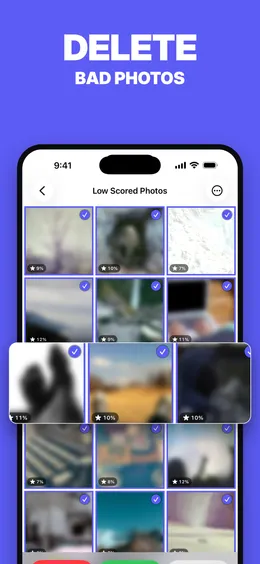
The distinction inside that mechanism matters. An aesthetics score is a judgment about a picture as a whole (framing, exposure, motion, subject), not a focus measurement. A photo can score low because it is genuinely out of focus, or because it was taken in a dark room, or because it is a deliberately shallow-focus portrait that a model reads as soft. Which is why the score belongs on screen next to the thumbnail rather than hidden behind an automatic selection.
Which iPhone apps find blurry photos?
Four of the five third-party apps here ship a browsable quality category; the fifth, Cleanup, uses sharpness only to mark a best pick inside a similar group, and Apple’s Photos app surfaces quality nowhere at all. The table’s conclusion in one sentence: they mostly agree on what to call the category and disagree entirely on how much they will tell you about it, so the practical difference is whether you can see and move the threshold before deleting anything.
| App | What the category is called | How the decision is made | Can you see or tune it? | Documents and utility captures |
|---|---|---|---|---|
| PhotoBroom | Low Scored Photos | Apple Vision scores each photo on the device for overall aesthetic quality. Items at or below your cutoff are listed lowest first. | Yes to both. The score appears on every thumbnail and the cutoff is user-adjustable. | Excluded by default. The same model flags utility captures separately, and an optional setting folds documents, receipts and scans into the list if you want them. |
| CleanMy®Phone (MacPaw) | Blurred, inside the Declutter module | Not documented. MacPaw publishes no threshold and no scoring detail for this category. | No published control or score. | Not separated. MacPaw’s Organize module does have a Documents group, but it is a browsing aid rather than a filter on the blurred list. |
| Cleaner Kit (BP Mobile) | Blurred, alongside similar, duplicates, screenshots and “with text” | Not documented. The listing describes AI sorting into buckets without stating a mechanism. | No published control or score. | Separated in effect: a distinct “with text” bucket sits alongside the blurred bucket. |
| Swipewipe (MWM) | Clutter detection covering similar photos, blurry shots and screenshots | Not documented. Clutter detection sits beside the swipe loop as a secondary feature. | Not user-tunable. | Not separated in any documented way. |
| Cleanup: Phone Storage Cleaner (DEEP FLOW) | No blurred category. Sharpness is used to mark a best pick inside a similar group instead. | Not documented. An independent hands-on reviewer found it usually picks the sharper frame to keep. | No published control or score. | Not applicable. There is no quality bucket to sweep them into. |
| Photos app (Apple) | None. Media Types sorts by format and the Duplicates album by duplication. | Not applicable. iOS ships no quality filter. | Not applicable. | Not applicable. |
Can any of these repair a blurry photo instead of deleting it?
PhotoBroom cannot, and that is a real limit rather than a technicality. PhotoBroom finds low-scored shots and helps you delete them; it never edits, enhances or re-encodes media, so if the photo you are worried about is the only picture of someone and it came out soft, this app has nothing to offer you. Swipewipe advertises AI photo enhancement aimed at old, blurry or low-quality photos, which is the closest thing to a rescue feature in this set. Whether that enhancement runs on the device or on a server is unverified, and Swipewipe’s privacy policy (hosted in the name of the original developer, Afternoon Products LLC) reserves the right to upload pictures from the photo library to company or service-provider servers. That is a permission the vendor has reserved, not evidence of what the app does, and it should not be read as more than that.
What do the free versions cover here?
PhotoBroom’s Low Scored Photos category is open to everyone. Nothing is locked, no scan result is hidden, the score and the cutoff control are available without paying, and what PhotoBroom meters is deletion: 50 items of any type per calendar day plus 2 large videos, resetting at device-local midnight. Marking a photo as kept is free and never counts against the allowance.
CleanMy®Phone works the other way round. MacPaw’s own knowledge base states that free users get Largest Videos and Screenshots inside Declutter plus Other inside Organize, and that duplicates, similar photos and blurred photos are premium, so the exact job this page is about sits on the paid side of its paywall. Swipewipe’s free tier is ad-funded, and Cleaner Kit’s is gated at the door: a review dated 2026-07-11 reports the paywall arriving on launch with no way to dismiss it. Neither documents an allowance. The full picture is in what you actually get free from iPhone photo cleaners.
When should you pick one of the others instead?
Pick CleanMy®Phone if blurred photos are one item on a longer list and you want the rest in the same app: it compresses video and converts Live Photos to stills, both of which reclaim space without deleting anything and neither of which PhotoBroom can do, it organises the library semantically into Travel, People, Pets and Food, it is bundled into Setapp, and it installs on iOS 17 where PhotoBroom requires iOS 18. Independent reviewers consistently rate its interface among the best in the category.
Pick Cleaner Kit when the storage problem is not photographs at all: email, contacts, calendar events, video compression and a Face ID-locked vault are all outside PhotoBroom’s scope by design. Note that its blurred and “with text” split is a better-designed taxonomy than most of the field. Weigh that against its App Privacy card, which declares Purchases, Location, Identifiers, Usage Data, Diagnostics and Other Data as used to track you across apps and websites owned by other companies, and against Surfshark’s February 2025 study of the ten most popular US cleaner apps, which named Cleaner Kit the heaviest data-sharer of the ten across nine data types. Pick Swipewipe if you need Android as well as iPhone, or if what you actually want is enhancement and not deletion.
What blurry-photo finders get wrong: documents and receipts
The failure mode nobody warns about is that useful photos frequently score badly. A receipt photographed on a restaurant table, a whiteboard after a meeting, a parking bay number, a passport page, a form filled in and captured for later. All of these are deliberately utilitarian, badly lit, off-square and unattractive, and a quality model reads them exactly as it reads an accidental pocket shot.
Delete a “blurred” bucket without looking and the receipts go with it.
The two apps that keep utility captures out of the way
PhotoBroom treats them as a class of their own: Apple’s model flags them separately, and PhotoBroom leaves them out of Low Scored Photos unless you switch on the optional setting that folds documents, receipts and scans in. Cleaner Kit gets somewhere similar by another route, sorting a “with text” bucket apart from its blurred bucket — a sensible piece of taxonomy that deserves the credit.
Credit for the taxonomy is as far as that goes, though. Whether Cleaner Kit’s photo analysis genuinely runs on the device could not be confirmed for this page: its description states that all AI processing happens on the iPhone only, no evidence of media upload was found, and its own App Privacy card still declares extensive tracking. Sensible bucketing and a clean privacy posture are separate questions, and only the first of them has an answer here.
Why nobody can tell you which app catches more blur
No vendor in this set except PhotoBroom documents how its blur or quality detection works, so no page — this one included — can compare their accuracy honestly. The empty cells in the table above are the finding, not a gap in the research. Nor was any app here run against a controlled test set of soft-focus, motion-blurred and document photographs. Everything above is an account of what each vendor publishes, and it should never be mistaken for a measurement of how well any of them detects anything.
Which leaves the boring procedure as the one that survives every route through this page: sort, look, then delete. If the real problem turns out to be duplicates rather than quality, the CleanMy®Phone comparison covers that split in detail.
Questions
How do I find blurry photos on my iPhone?
You need a third-party app, because iOS ships no quality filter. The Photos app sorts by media type and date, not by sharpness. PhotoBroom's Low Scored Photos category scores every photo on the device using Apple's Vision framework, lists them lowest score first, and shows the score on each thumbnail so you can see why something was surfaced before deciding. The cutoff is yours to move, so the list can be as strict or as forgiving as you want.
Does the iPhone have a built-in blurry photo finder?
No. The Photos app groups items under Media Types (Videos, Screenshots, Screen Recordings, Live Photos) and offers a Duplicates album, but nothing in iOS ranks photos by sharpness or by quality. Apple's own Vision framework does expose an on-device aesthetics score, which is what PhotoBroom's Low Scored Photos category is built on, but no user-facing feature in the Photos app surfaces it.
Will a blurry photo app delete my receipts and documents?
That is the risk worth checking before you bulk-delete anything. A photo of a receipt, a whiteboard or a parking bay number is deliberately utilitarian, so a quality score reads it as a weak photo even though you took it on purpose. PhotoBroom keeps utility captures out of Low Scored Photos by default and includes them only if you switch that setting on; Cleaner Kit separates a "with text" bucket from its blurred bucket. In any app, review before deleting.
Is there a free app to find blurry photos on iPhone?
PhotoBroom's Low Scored Photos category is open to every user with no category gating and no hidden results, and free deletion is metered at 50 items of any type per calendar day plus 2 large videos. MacPaw's knowledge base places CleanMy®Phone's blurred photos behind the paywall, alongside duplicates and similar photos, so its free tier does not cover this job. Slidebox and Swipewipe fund their free tiers with advertising instead.
Can an app fix a blurry photo instead of deleting it?
Some try. Swipewipe advertises AI photo enhancement aimed at old or low-quality photos, which is a different job from finding and deleting. PhotoBroom does not enhance, edit or re-encode anything. It finds low-scored shots and helps you remove them, so if the goal is to rescue a photo, not to clear space, PhotoBroom is the wrong tool.
Why did an app mark a photo I like as low quality?
Because an aesthetics score is a general judgment of a picture, not a blur measurement. A deliberately shallow-focus portrait, a panning shot or a dim candlelit photo can all score low while being exactly what you wanted. This is why PhotoBroom shows the numeric score on every thumbnail, sorts lowest first and pre-selects nothing: the score is a sorting aid, and the decision stays yours.